Apple Creator Studio Debuts: A Unified Creative Powerhouse for Video, Music, Design, and Productivity
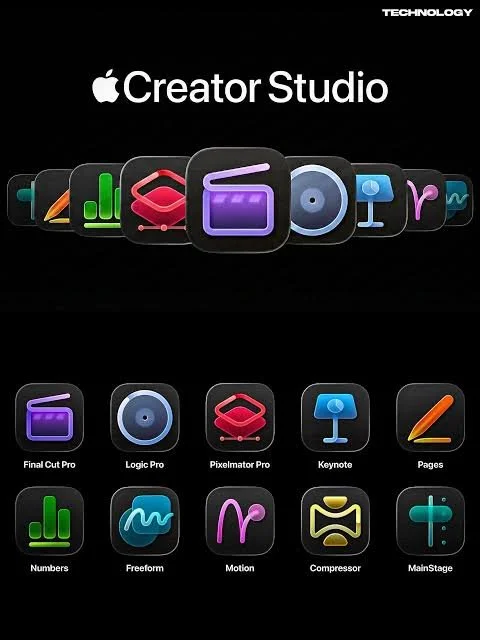
Apple has officially launched Apple Creator Studio, a new subscription suite that brings together the company’s most advanced creative applications under one affordable plan — a move seen by many as a strategic bid to rival established offerings like Adobe Creative Cloud.
Available on the App Store starting January 28, 2026, Apple Creator Studio combines studio-grade tools for video editing, music production, image design, and general creative work across Mac, iPad, and — through intelligent features in key productivity apps — iPhone.
What’s Included: A Full Suite of Creative Tools
At its core, Apple Creator Studio includes access to:
Final Cut Pro (Mac and iPad): Apple’s flagship video editing suite with advanced tools and performance.
Logic Pro (Mac and iPad): A professional digital audio workstation for music production.
Pixelmator Pro (Mac and iPad): A powerful image-editing and graphic design app, arriving on iPad for the first time.
Motion, Compressor, and MainStage (Mac): Tools for motion graphics, media encoding, and live music performance.
Premium features and content for Keynote, Pages, Numbers, and eventually Freeform, including a new high-quality Content Hub with templates, graphics, and AI-powered enhancements.
These apps can be used across Apple hardware, enabling creators to start a project on iPhone or iPad and finish it on a Mac — all within a unified ecosystem powered by Apple’s tools and, increasingly, intelligent AI features.
Why It Matters: Power, Access, and Affordability
Apple Creator Studio represents a major shift in how Apple delivers pro creative software. Instead of separate purchases for each app — which could collectively cost several hundred dollars — subscribers get studio-grade tools for $12.99 per month or $129 per year, including a one-month free trial.
For students and educators, a discounted tier is available at $2.99 per month or $29.99 per year, making professional creativity tools more accessible to learners and small creators.
The subscription also supports Family Sharing, so creative tools and premium content can be shared with up to five family members on Apple devices.
This value proposition — combining multiple pro apps and premium creative features at a relatively low price — positions Apple Creator Studio as a compelling alternative to higher-priced suites like Adobe Creative Cloud.
What’s Great About It
1. One Hub for Major Creative Workflows
Instead of juggling separate licenses, Apple Creator Studio pulls together industry-leading tools for video, audio, design, and interactive media in one place. From shaping visuals in Pixelmator Pro to producing music in Logic Pro, creators can work seamlessly across disciplines.
2. Pixelmator Pro on iPad
For the first time, Pixelmator Pro — long admired on Mac for its powerful yet approachable image editing — is optimized for iPad and Apple Pencil, broadening creative expression beyond desktops.
3. AI-Powered Enhancements
New intelligent tools — such as transcript search and visual object search in Final Cut Pro — help reduce repetitive tasks and speed up workflows, letting creators focus more on artistry than mechanics. While some features are subscription-locked, they are designed to unlock highly productive workflows.
What Could Be Tweaked or Improved
1. Feature Gating on Previously Free Tools
Some intelligent features and premium templates in Keynote, Pages, Numbers, and Freeform — historically free apps — now reside behind the Creator Studio paywall. This “freemium” shift may raise concerns for users who don’t need the full suite but value specific new features.
2. Subscription vs. One-Time Purchases
Although the subscription price is attractive, advanced users who already own individual Mac versions of Final Cut Pro or other apps may find the transition confusing, especially as some new features are exclusive to Creator Studio subscribers. Balancing subscription value with standalone ownership remains a point of discussion.
3. Platform Parity and Future Features
While most key apps are available across Mac and iPad, some remain Mac-only (like Motion and Compressor), and premium Freeform features are slated to arrive later. Clarity around future feature availability will be important for creators planning long-term workflows.
How to Subscribe and Get Started
Subscribing is straightforward:
Open any Apple Creator Studio-included app (e.g., Final Cut Pro) on your Mac or iPad.
Tap or click Accept Free Trial when prompted.
Sign in with your Apple ID and confirm your subscription plan (monthly or annual).
Start creating — new projects and access to premium content unlock immediately.
Alternatively, you can subscribe directly from the App Store subscription interface or within productivity apps like Keynote when engaging with premium content. Family Sharing can be activated in your Apple account settings to share access with household members.
Looking Ahead
With Apple Creator Studio, Apple is expanding its services portfolio while empowering creators with integrated tools and content. As the ecosystem evolves, subscribers can expect ongoing feature updates and deeper AI integration, reflecting Apple’s broader commitment to creativity across devices and contexts.